Automated Welcome Message with ClickLeadz #
ClickLeadz lets you instantly send a personalized welcome message to new group members as soon as you approve them — directly inside Facebook.
This guide shows you how to enable it, customize your message, and automate your approval workflow.
Before You Begin — Important Notes #
- This feature works only when you approve members using ClickLeadz buttons (Approve / Approve & Send Message).
- Messages are sent via your personal Facebook profile, not a Facebook Page.
- Auto-messaging does not trigger when Facebook auto-approves members.
Step 1 — Turn On Welcome Messages #
- Open the ClickLeadz Web App
- Click the Settings (⚙️) icon beside the group you want to configure
- Select the Welcome Message tab
- Toggle Enable Welcome Message to ON
You’ll now see a message template field appear.
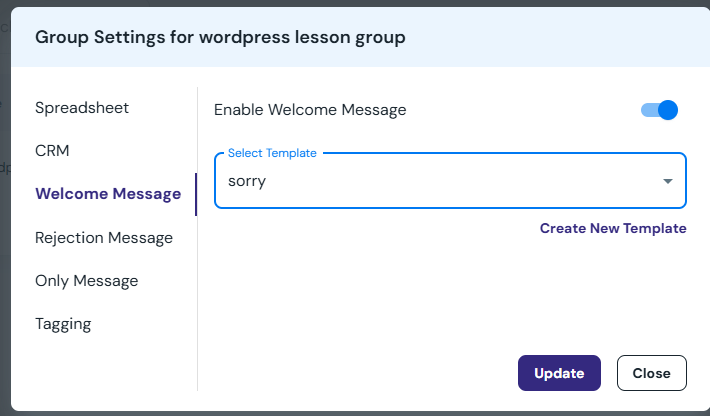
Step 2 — Choose or Create Your Message Template #
Once enabled:
- Select a pre-saved message from the dropdown
or - Click Create New Template to write a fresh welcome message
💡 Tip: Your message can include:
- Personal greeting
- Links to resources
- Call-to-action
- Offer or lead magnet
Example:
Hey! Welcome to the group 🎉
I just approved your request — excited to have you here!
Here’s a free resource to get started: {{your link}}
Click Update to save your message.
Step 3 — Approve Members & Send Messages #
Now go to your:
Facebook Group → Member Requests tab
When the ClickLeadz Chrome Extension is active, you’ll see new action buttons:
- Approve
- Approve & Send Message (appears only when Welcome Message is enabled)
- Custom Approve All
Click:
Approve & Send Message #
→ The member is approved
→ Your welcome message is instantly sent to their inbox
No extra steps. No page refresh required.
What Happens Next? #
Each approved member:
✔ Gets your automated welcome message
✔ Is added to your ClickLeadz lead dashboard
✔ Is saved into your spreadsheet (if enabled)
✔ Can be tagged (if tagging is enabled)
#
With Welcome Messages enabled, ClickLeadz helps you:
- Give members a great first impression
- Share offers or lead magnets immediately
- Start conversations in Messenger instantly
- Warm up cold group leads automatically
Need More Help? #
Our support team is here for you.
Email: support@clickleadz.io
Live Chat: Inside your dashboard
Docs: help.clickleadz.io (coming soon)


