Table of Contents
This guide shows you how to integrate ClickLeadz with Brevo (formerly Sendinblue) so every approved Facebook group member is captured, tagged, and synced to your email lists automatically.
Before you begin, please ensure that:
- You’ve installed the ClickLeadz Chrome extension
- You’ve connected your Facebook group and created a spreadsheet for your leads
- You’ve already set up membership questions for your Facebook group
Once these are ready, follow the steps below to connect ClickLeadz with Brevo.
Step 1 — Log in to Your Brevo Account #
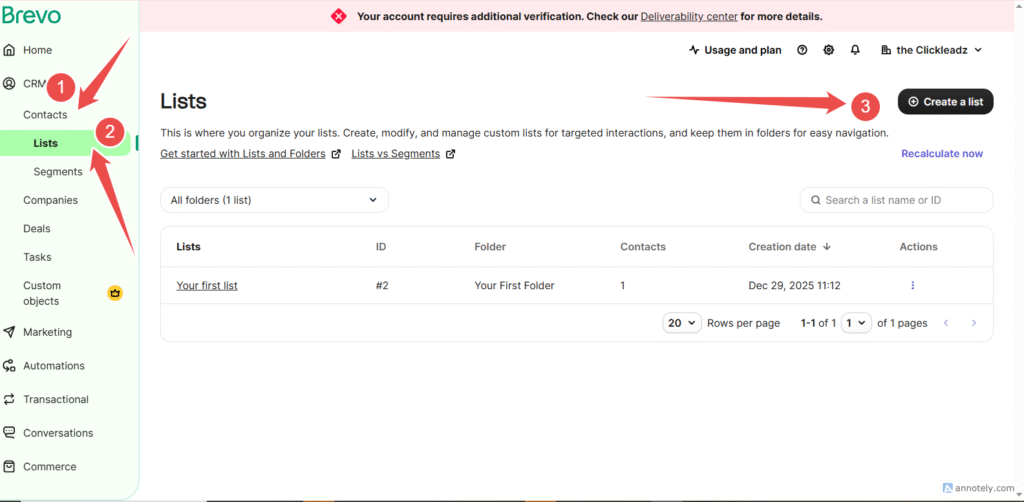
- Go to your Brevo dashboard.
- From the left-hand menu, click Contacts.
- Select Lists.
Step 2 — Create a Contact List #
- Click Create a list.
- Enter a name for your list (this will receive leads from ClickLeadz).
- Save the list.
- copy the List ID in the url bar
Step 3 — Get Your Brevo API Key #
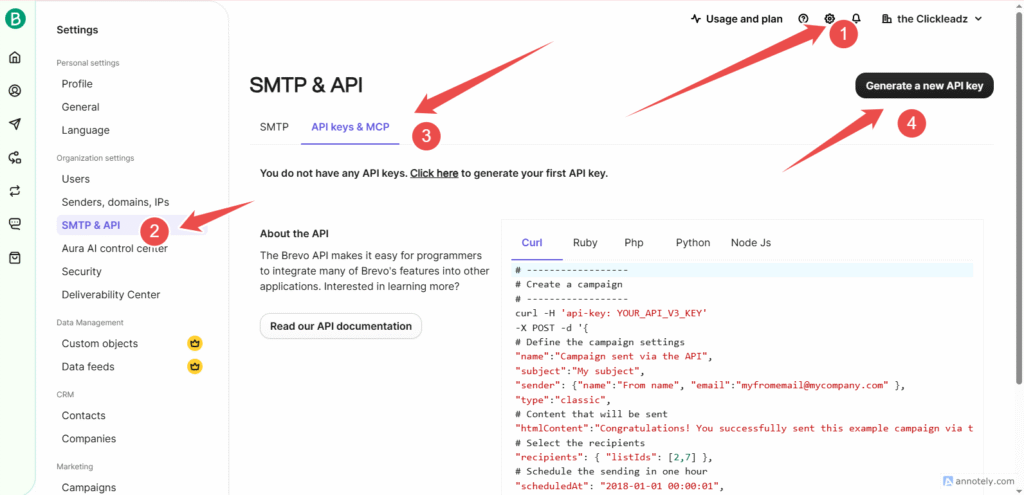
- Click your profile icon in the top-right corner.
- Select SMTP & API.
- Open the API Keys tab.
- Click Create a new API key.
- Name the key (e.g.,Facebook Coaching).
- Copy the API key and save it securely.
Step 4 — Open Your ClickLeadz Extension #
- Click the ClickLeadz icon in the top-right corner of your Chrome browser.
- Locate your connected Facebook group.
- Click the Settings (⚙️) icon next to the group.
- Under Autoresponder Integration, choose Brevo.
Step 5 — Enter Your Brevo Credentials #
- In the integration window, click Credentials.
- Paste the following:
- Brevo API Key
- List ID
- Click Verify & Update.
✅ A green confirmation message will appear once verification is successful.
Integration Complete! #
Your ClickLeadz account is now successfully connected to Brevo.
From this point onward:
- Every new member approved through ClickLeadz will be automatically added to your Brevo contact list
- Member details will be saved in your connected Google Sheet
- Leads will be visible in your ClickLeadz dashboard for tagging and campaigns
Related Articles #
- How to Integrate ClickLeadz with MailerLite
- How to Integrate ClickLeadz with Mailchimp
- How to Integrate ClickLeadz with GetResponse
- How to Integrate ClickLeadz with ActiveCampaign


